

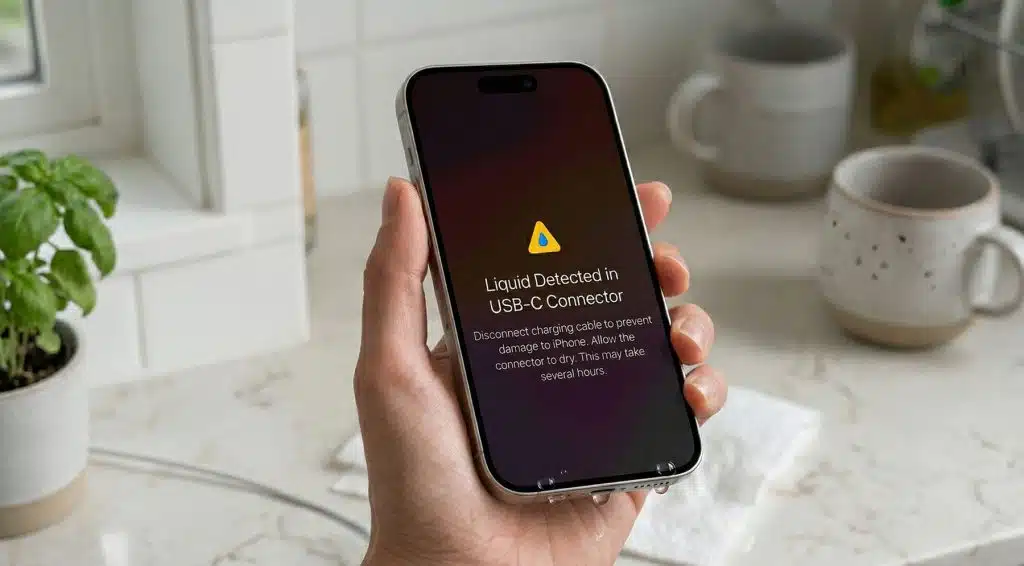
Dropped Your iPhone in Water?
Spilled a drink on your phone? Dropped it in the sink? Left it in your jeans… and ran a wash?
You pick it up, dry it off, and think “It’s water-resistant… should be fine”. Then you plug it in and get hit with “Liquid detected in connector”. Now what?
First: Your iPhone Can Handle Water (To a Point)
Most modern iPhones (Lightning and USB-C models) are designed to resist water.
But here’s what people miss:
- Water resistance isn’t permanent
- It weakens over time
- It doesn’t protect against things like detergent, pressure, or heat
So the real risk isn’t just water, it’s what happens next.
That “Liquid Detected” Warning Matters
Whether you’re using Lightning (older iPhones), or USB-C (newer models), the warning exists for one reason. To stop you from damaging your phone.
If you ignore it and charge anyway, you risk short circuits, corrosion and long-term charging issues.

What NOT To Do (This Is Where People Kill Their Phone)
According to Apple avoid all of these:
- Don’t use rice – It’s outdated advice and can leave dust in your port.
- Don’t use heat – No hairdryers. No ovens. No “sun baking.” Heat can warp internal seals, push moisture deeper and damage components.
- Don’t blow air or stick things inside – Avoid cotton buds, compressed air and paper towels in the port.
What you should do instead
- Stop charging – unplug your phone immediately.
- Tap out excess liquid – Hold your iPhone with the port facing down and gently tap it. This helps clear trapped water from the charging port.
- Let it air dry – Place it somewhere dry, cool and with airflow. Near a fan is ideal.
- Wait (longer than you think) – Apple suggests waiting at least 30 minutes, but realistically a few hours (or longer) is safer, especially after heavy exposure.
- Try charging again – if the warning disappears, you’re good. If it comes back keep waiting, moisture is still inside.
- Need power urgently? Use wireless charging, because it avoids the port entirely no risk of shorting.
Silica Gel Packs (The Real MVP)
Those little packets that come in shoe boxes and electronics? They’re far better than rice at absorbing moisture.
If you’re worried about water ingress, you can try put your phone in a container, surround it with silica gel packs and seal it.

When it’s more serious
Watch for these signs after water exposure:
- Charging issues
- Muffled speakers
- Foggy camera
- Screen glitches
- Overheating
These often show up later, not immediately. If you experience any of the above, you may want to go to visit Apple or an authorised phone repair shop.
Key takeaways
- Forget everything you’ve heard about rice. If you’re worried, use silica gel packs.
- Don’t rush it. Don’t force it. Let it dry properly.
- Most iPhones don’t die from water anymore. They die because people plug them in too early, or try to “fix” them too aggressively.
Disclaimer: The advice provided in this article is meant for general informational purposes only. Always refer to the care instructions provided by the manufacturer for your specific laundry machines and clothing/bedding items.
Related articles
The Pros and Cons of Using Fabric Softener
In this article we explore the pros and cons of using fabric softener, the different types available, and find out when it might be better to skip...
read more
6 Reasons to Love Cold-Water Washing (And 3 Times to Think Twice)
Discover when cold water washing works best, when to avoid it, and how to get cleaner laundry while saving energy.
read more